Jobcode/Employee Detail tab
The Jobcode/Employee Detail tab displays productivity, hours, and labor cost data by job class, job code, or employee. Use this tab to analyze performance at a more detailed level and identify differences across roles.
The data in this tab matches the JobCode Detail tab in the Department Management Productivity report.
Use the Worked/Paid toggle to switch between worked and paid values. Select Expand All to view job code details (table views only).
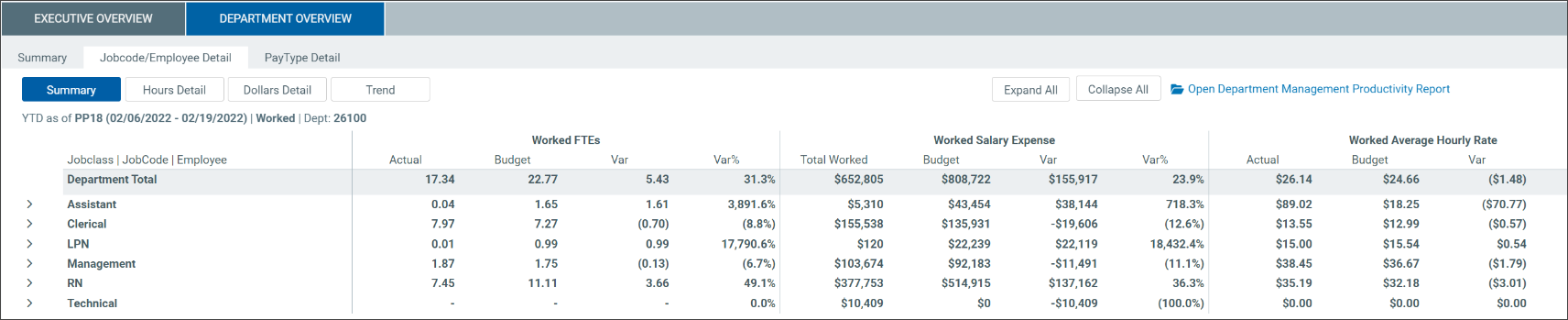
This table describes the JobCode/Employee sub-tabs.
| Sub-tab | Description |
|---|---|
| Summary |
Displays key productivity and labor metrics by job class, job code, or employee. Includes FTEs Full-time equivalent. A unit of measure that represents a full-time workload regardless of how many people are needed to cover it., salary expenses, and average hourly rate with actual, budget, and variance values. |
| Hours Detail | Displays hours by pay type (for example, regular, overtime, and education) along with total worked hours and FTEs. |
| Dollars Detail | Displays labor costs by pay type, including regular, overtime, and premium pay. Also includes total worked dollars, budget, and average hourly rate. |
| Trend | Displays interactive charts showing trends for hours, FTEs, and utilization. |
Use the Trend chart
-
Hover over a bar to view detailed values.
-
Click a legend item to hide or show that data in the chart.
-
Select JobCode or JobClass to change how data is grouped.
-
In JobClass view, click Filter to select specific job classes.
Related Department Overview sub-tabs:
