Configure Budget Tab Headings
This section of the 01 Budget Configuration driver configures the sheet headings for time period columns in budget plan files.
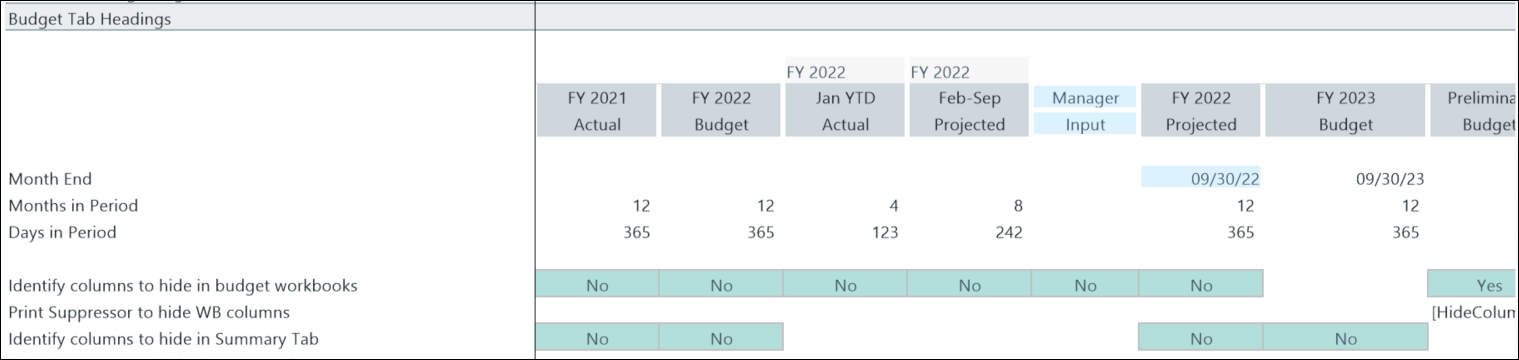
This table describes the options in this section.
| Month End |
Sets the end date for monthly spread sections in budgeting driver and plan files.
NOTE: Update this for the current year end at the start of each budget cycle.
|
| Months in Period |
Sets the number of months in each period. Typically 12 for past year actuals; may vary for YTD and projected periods in the current year. |
| Days in Period |
The total number of business days in the period.
NOTE: Update this for each budget year.
|
| Identify columns to hide in budget workbooks plan files |
Enter columns to hide on the Stat_Rev and Expense sheets in budget plan files. |
| Print Suppressor to hide WB columns |
Indicates which columns are suppressed based on the previous row. |
| Identify columns to hide in Summary Tab |
Controls column display on the Summary sheet in the budget plan files.
|
| Print Suppressor to hide Summary columns |
Indicates which columns have been suppressed based on the previous row. |
Budget configuration includes the following tasks:
