As part of the implementation process, a Strata implementation consultant helps you create an Axiom Financial Planning file group for the current year.
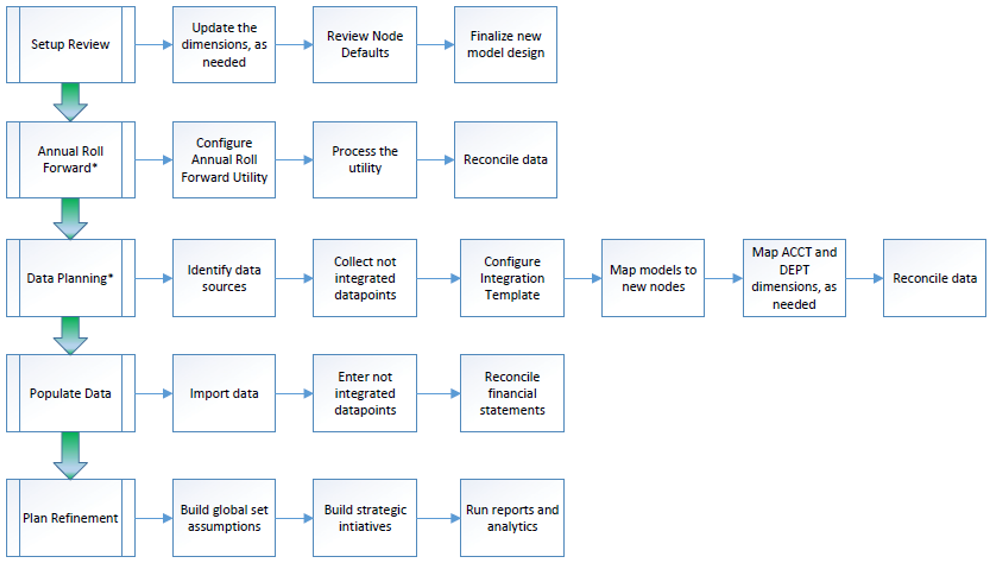
NOTE: All the steps after Data Planning only happen if you are using other Axiom products with Axiom Financial Planning.
Roll Forward Next Year adapter
Use the Roll Forward Next Year adapter to create a new file group and copy driver values and security in one step. The system copies data from the prior year driver data set and calc methods all at once. The system automatically changes the FP_NextYear file group alias.
-
Click Create New File Group > Roll Forward Next Year in the Administration section Fin Plan Admin task pane.
NOTE: This is a scheduler job.
-
Choose continue in the confirmation modal to confirm job.
Roll Forward Next Year job is scheduled. When it completes, you can see the FP_NextYear file group in Axiom Explorer.
Next, you can Add data to a new file group.
