Budget Department Audit report
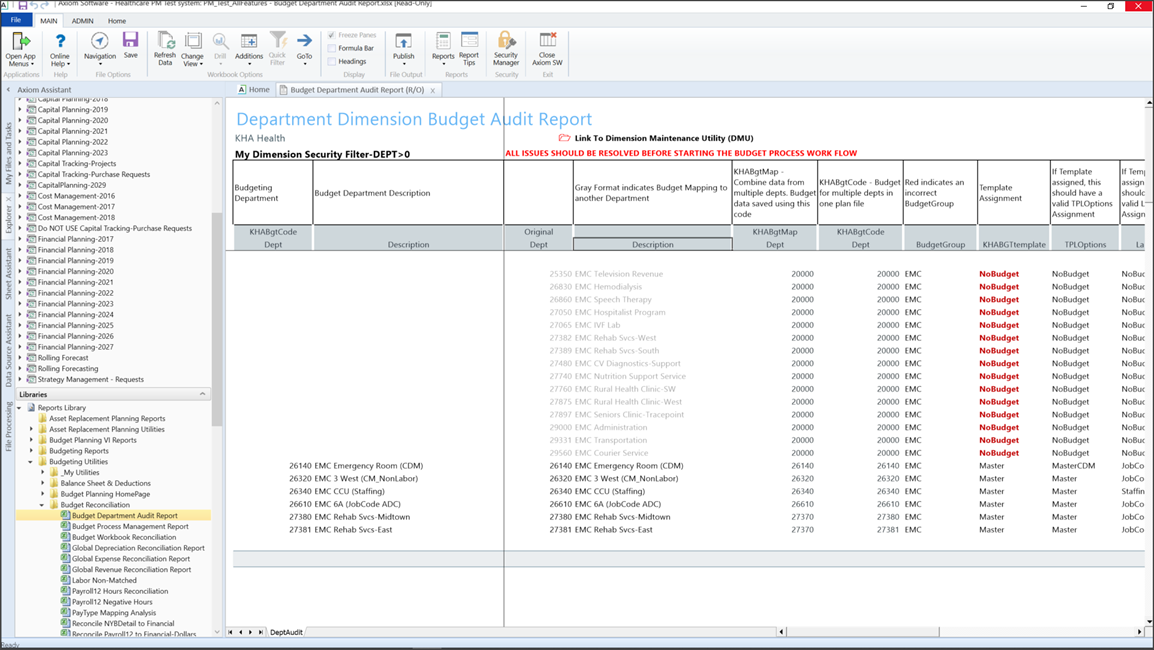
This report helps Budgeting administrators resolve mapping errors at the department level by highlighting inconsistencies in the DEPT dimension table before building plan files and starting process management.
Run the report to view all records or only mapping errors. You can include all of the budget groups or select one or more specific budget groups.
Cell entries in bold red font indicate a possible mapping error in the DEPT dimension table. The report also includes the number of issues found.
IMPORTANT: This report must show no errors before starting your budget process and building plan files.
Access the report in Axiom Assistant
Non-admin users:
Go to: Main > Navigation > Explorer > Libraries > Reports Library > Budgeting Utilities > Budget Reconciliation > Budget Department Audit Report.
NOTE: For additional instructions, see Browse the Report Library.
Admin users:
Go to:Admin > Admin Task Panes > Budget Admin > Budget Reporting > Budget Utilities > Budget Reconciliation > Budget Department Audit Report.
Report columns
This table describes the Budget Audit Dimensions columns.
| Column | Description |
|---|---|
| Budgeting Department |
The name of the mapped budgeting department. NOTE: The system shows the first mapped department and doesn't repeat mapped numbers. If the field is blank, the system uses the preceding number. |
| Budget Department Description | A brief description of the mapped department. |
| Original Dept | The original department number. If it is mapped to another department, the system uses a light gray font, and the budget for that department appears in the mapped department plan file. |
| Description | The full description of the department. |
| KHABgtMap Dept |
Displays KHABgtMap mapping. Red font indicates an incorrect mapping between KHABgtMap and KHABgtCode. Combines data from multiple departments (under a single department) during plan file creation. The system saves plan file budget data to Budget tables using the department code from this column.
NOTE: When combining departments, if the KHABgtMap Dept code does not equal the Original Dept code, then it must match the KHABgtCode Dept code. A warning occurs if not. |
| KHABgtCode Dept |
Used to budget multiple departments in one budget plan file. NOTE: When combining departments, the KHABgtCode Dept column displays the plan file code that the combined departments are mapped to (from KHABgtMap column) and will use for budgeting. A warning occurs if the codes in KHABgtCode do not match the plan file codes in KHABgtMap. For example, a warning appears if the Original Dept code is in the field.
|
| BudgetGroup | Displays budget group assignment. Red font indicates an invalid assignment. |
| Template Assignment |
The template the department is assigned to. NOTE: Red font indicates no mapping to a template, but current activity in the department. The warning does not stop the process but serves as an indicator to review it. |
| TPLOptions |
Displays TPLOptions Assignment if a template is assigned. NOTE: Red font indicates that the option is an invalid assignment. NA indicates that a TPLOptions Assignment is selected when a template name exists in column M. |
| LaborType |
Displays Labor Assignment if a template is assigned. NOTE: Red font indicates that the Labor Assignment is not valid for the specified template. |
| ShowonList |
TRUE means that no configuration exists, but you intend to budget. The system checks for areas with configuration issues where "Show on List" is set toYes. FALSE is the preferred outcome. |
| CurYTD Revenue |
Queries the current year activity. If current activity exists, expect either template assign or map Dept via KHABgtCode. |
| CurYTD Expense | Queries current year activity. If current activity, expect either template assign or map Dept via KHABgtCode. |
| Warning BudgetGroup | Displays BudgetGroup issues. |
| Warning Template | Displays setup issues from the Template Assignment column. |
| Warning KHABgtMap |
Displays the number of KHABgt mapping errors that must be corrected before building the plan file. KHABgtMap needs to match a valid Dept code. The following images display combining KHABgtCode and KHABgtMap functionality:
|




Resolve issues
Use theDimension Maintenance utilityto correct any Budget Department Audit report issues. You can make adjustments in the DEPT dimension and rerun the report to verifychanges.
