Import monthly statistic data
Save the import file in a directory accessible by the Axiom application server. We recommend using a ST_prefix.
-
Go to Admin > Imports & Data Utilities > Imports > Management Reporting > 02-Load Monthly Stats > Execute.
-
Click Execute.
-
Select the ACT or BUD table and enter a year to load.
-
Import the source file.
NOTE: See Resolve import validation errors for import errors.
If your statistics are not loaded through an import configured by your Strata implementation consultant, you can load them using a Save to Database report.
-
Go to Main > Navigation > Explorer > Reports Library > Management Reporting Utilities > Data Input > Input Monthly Statistics.
-
-
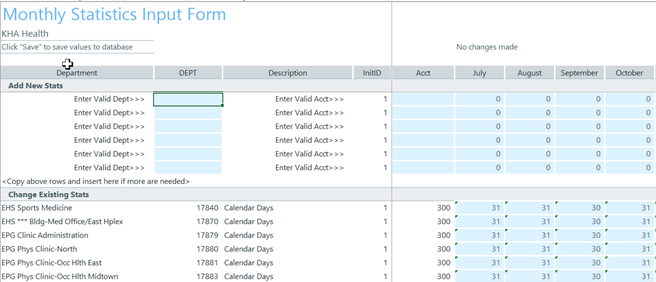
Go to Add New Stats and enter a DEPT and ACCT.
-
Click Refresh to view all statistic combinations from the database.
-
Go to the Change Existing Stats section to update monthly values.
-
Go to Main and click Save.
