Configure Summary section
The Summary section summarizes certain operational statistics from departments that are assigned to various budget groups posted within the driver. Statistics are categorized in the budget group sections (for example, Patient Days) by populating the ACCT table > BudStat column.
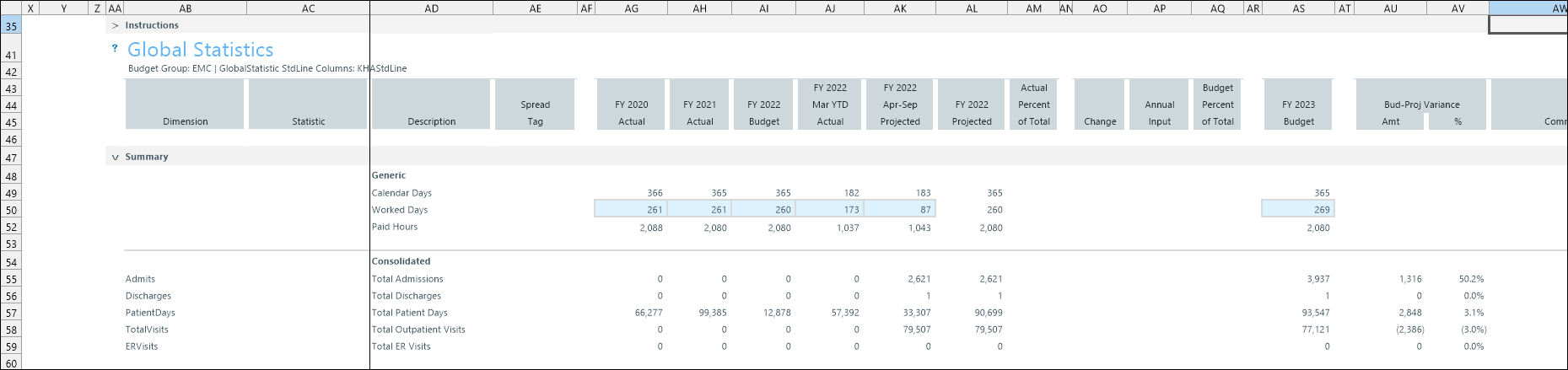
Interactive caret icons (>) provide expand or collapse features for these areas:
-
Instructions
-
Summary
-
Budget group blocks
Double-click a caret to expand or collapse.
Configure Worked Days
Adjust your worked days to match the budgeted worked days in the Labor Configuration driver.
This table describes the Statistics summary section.
| Field | Description |
|---|---|
| Instructions | Guidelines for using the driver. |
| Context header | Displays the selected refresh variables for budget group and standard line associated with the assigned GlobalStatistic calc method. |
| Question mark icon | Click to open the Budget Statistics topic in the Axiom Budget Planning and Performance Reporting online help. |
| Summary |
Summary of operational statistics from departments that are assigned to various budget groups posted within the driver. |
Budget Statistics configuration includes the following tasks:
