Configure Std PayTypes section
This section of the 02 Budget Labor Configuration driver defines the pay categories for Productive, NonProductive, and Contract labor and determines how different paytypes are distributed over the months of a year. You can assign these categories to the JobCode, Staffing, and Employee columns in the PAYTYPE dimension table.
NOTE: Your Strata Implementation Consultant configures the initial set up during implementation.
Configure the Standard Budget PaytTypes fields.
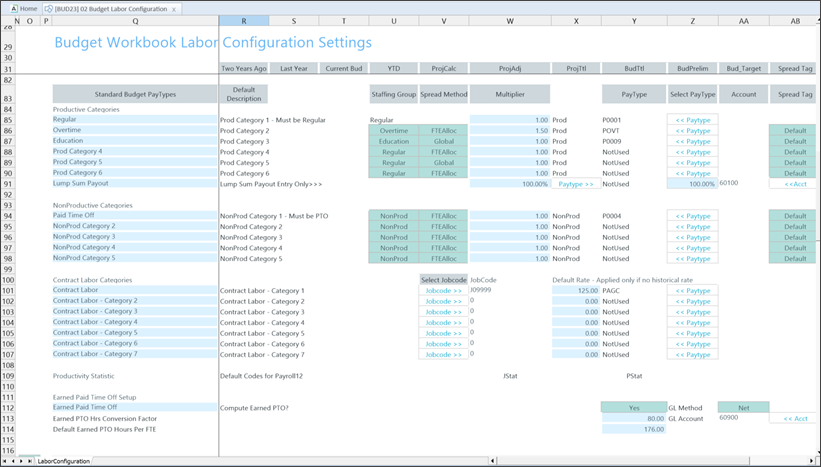
This table describes the Standard Budget Pay Types row categories.
| Productive Categories |
Includes regular, overtime, and education.
NOTE: If "NotUsed" is selected in the PayType (column Y), lump sums are excluded in the plan files.
|
| NonProductive Categories |
Includes time off and other non-productive hours. |
| Contract Labor Categories |
Defines up to seven categories of contract labor in the labor models.
NOTE: A valid code selection is required for both PayType and Jobcode to save Contract Labor hours and expense from the plan files to the Bud_Pay12 table. However, if PayType code is set to "NotUsed", saving Contract Labor data from the plan files is disabled.
|
| Productivity Statistic |
The PayType used to store productivity statistics, usually PStat. |
| Earned Paid Time Off Setup |
Determine how PTO is computed based on labor hours.
Choose whether to use calculated PTO in the budget.
-
Select No to use historical PTO values.
-
Select Yes to calculate earned PTO, then choose Gross or Net.
|
| Earned PTO Hrs Conversion Factor |
The rate at which hours accrue, based on the account. |
| Default Earned PTO Hours Per FTE |
Default annual PTO hours earned per FTE. |
This table describes the columns in Standard Budget PayTypes.
| Spread Method |
Assign a spread method to each pay type row.
-
Global: Admins assign these percentages in columns AB-AM.
-
If you update percentages from the default "Days in Month" spread settings, set the Spread Tag in column AB to Previous Input before saving the driver. This keeps the updates when you reopen the driver and ensures that they appear in the plan file.
NOTE: Non-productive pay types are an example of when to use assigned percentages, as paid time off is often higher in periods that include holidays.
-
FTEAlloc: The allocation rate in column J multiplies the budgeted values for each month.
-
History: The system uses historical percentages of total hours to allocate budgeted values and match past actuals.
|
Budget Labor configuration includes the following tasks:
