View budget plan file templates
Templates define the file structure for budget plan files. A template includes one or more sheets that are copied into a budget plan file at the time it is created. Individual cells in templates may contain formulas (tags) that control how data flows from the database into the budget plan file cells. Some tags also define how data entered or modified in the plan is written back to the database.
In Axiom, templates are standardized for each application and not editable by users. However, you can view template content to trace formulas back to the source data and understand how data flows between plan files and the central database.
The templates—and sheets within them—used to create a plan file are based on settings in the related driver files and dimension tables.
NOTE: After plan files have been created from templates, subsequent changes to the template do not impact the plan files unless the plan files are re-created.
-
In the
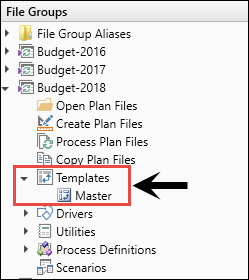
- Click Templates.
- Double-click the template to view.
